

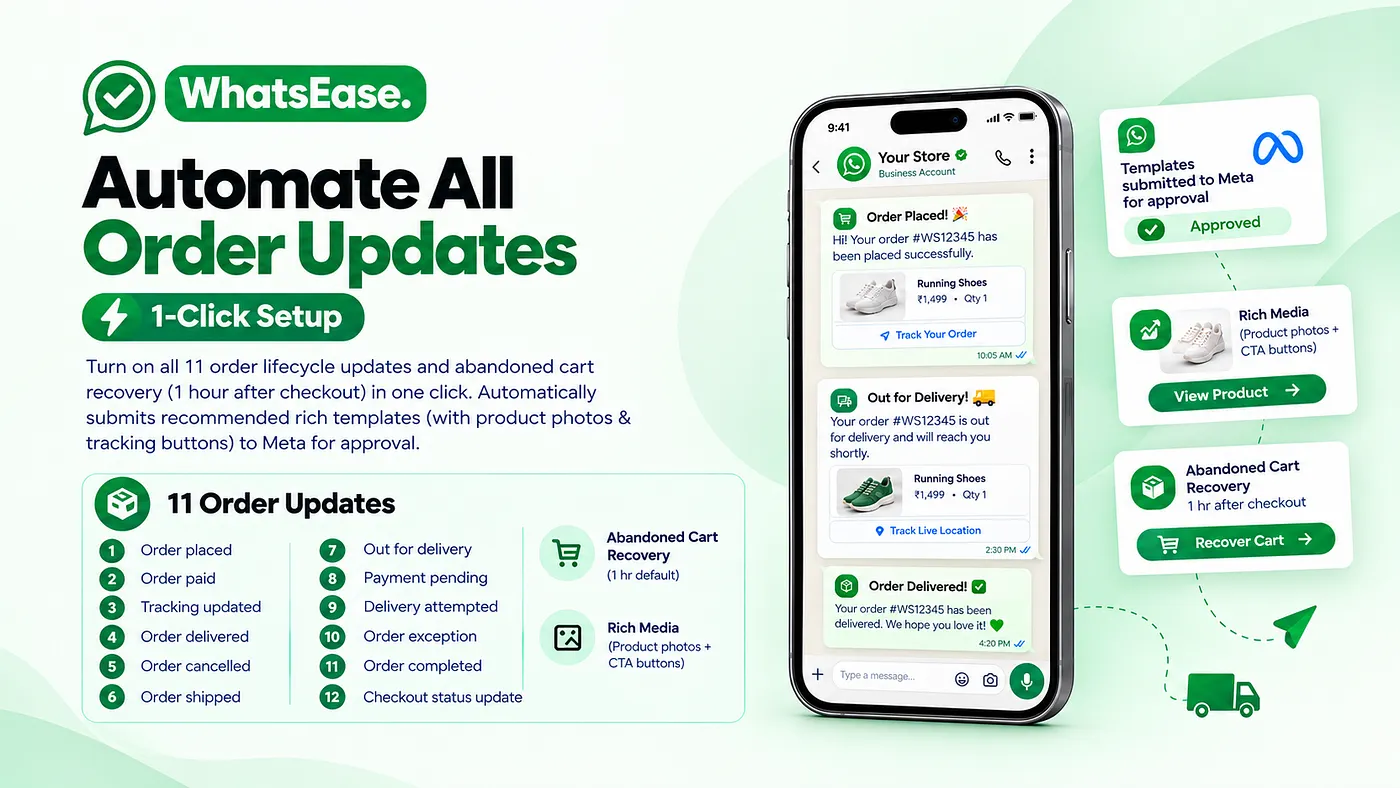
Connect your store, press one button, and WhatsEase turns on 11 order updates plus abandoned cart recovery, with product photos and tracking buttons, auto-submitted to Meta for approval.
Connect your Shopify store to WhatsEase, press one button, and every order update your customers need goes out on WhatsApp automatically. No template writing. No workflow building. No guesswork.
If you run a Shopify store, you already know the pattern. A customer places an order and, within minutes, the questions begin:
- “Has my order been confirmed?”
- “Did my payment go through?”
- “Where is my parcel?”
- “Why hasn’t it arrived yet?”
Every one of those messages is a support ticket, a delayed reply, or a cancelled order waiting to happen.
Most stores know the fix: send proactive updates on the channel customers actually read, which is WhatsApp. The hard part has always been the setup. Creating a template for each stage, getting each one approved by Meta, and wiring each one to the right Shopify event can take days.
WhatsEase’s Automate All Order Updates removes that work. Let’s break it down.
What Is 1-Click Setup?
1-Click Setup is a WhatsEase feature that switches on your entire post-purchase communication system in one action. Once your Shopify store is connected, WhatsEase turns on all 11 order lifecycle updates plus abandoned cart recovery, and submits ready-made, recommended templates to Meta for approval on your behalf.
That means three things happen without you building anything:
- All 11 order updates go live, covering the journey from “Order placed” to “Order completed.”
- Abandoned cart recovery starts, with a default reminder 1 hour after checkout.
- Rich templates are submitted to Meta automatically, with product photos and tracking buttons already designed in.
The only thing you do is connect your store. That’s it.
The 11 Order Updates (and Checkout Recovery) You Get
Every stage of a Shopify order has a moment where the customer wonders what is happening. Here is what 1-Click Setup covers, in the order your customers experience it.
The happy path
- Order placed: The customer completes checkout and wants to know the order is received.
- Order paid: Payment is confirmed, so the customer can stop worrying.
- Tracking updated: A tracking number or status change is added to the order.
- Order shipped: The parcel leaves your hands and is on its way.
- Out for delivery: The courier is heading to the customer today.
- Delivery attempted: The courier tried, and the customer needs to act.
- Order delivered: The parcel has arrived.
- Order completed: The order is closed out successfully.
When things need attention
- Payment pending: Payment has not gone through yet, and a nudge helps.
- Order cancelled: The order was cancelled, so the customer hears it from you first.
- Order exception: Something went wrong in transit, and the customer is told early.
Plus: Checkout status update, which covers cart and checkout activity, including abandoned cart recovery.
The first group is the happy path. The second group is where good communication saves orders, support tickets and reviews.
Abandoned Cart Recovery, Built In
Beyond order updates, 1-Click Setup also turns on abandoned cart recovery.
By default, a reminder goes out 1 hour after checkout if the customer leaves without paying.
One hour is soon enough that the customer still remembers what was in the cart.
Rich Templates: Product Photos and Tracking Buttons
A plain text update tells a customer something happened. A rich update shows them.
The templates WhatsEase submits for you are built with:
- Product photos, so the customer instantly recognises the order.
- Call-to-action buttons, such as a tracking button that opens the shipment status in one tap.
This matters because WhatsApp templates must be approved by Meta before you can send them.
Normally that means writing the copy, choosing the format, submitting it, and waiting.
With 1-Click Setup, WhatsEase automatically submits its recommended rich templates to Meta for approval, so you start from a proven structure instead of a blank page.
Once Meta approves a template, it is ready to use for the matching order update.
How to Set It Up in 3 Steps
- Connect your Shopify store to WhatsEase.
- Open Automate All Order Updates and press 1-Click Setup.
- Wait for Meta approval on the submitted templates. Once approved, your updates start going out automatically.
There is nothing to code, and no workflow to drag together.
If you later want to change the wording or turn a specific update off, you can adjust it after setup.
Why Shopify Store Owners Will Love It
- Fewer “Where is my order?” messages: Customers get the answer before they ask.
- A better post-purchase experience: Every stage, from payment to delivery, is acknowledged.
- Less manual work: No per-event setup and no template drafting.
- Faster launch: Templates go to Meta for approval automatically.
- Recovered sales: An abandoned cart reminder goes out 1 hour after checkout.
- Trust: Updates arrive on WhatsApp, where customers already talk to people and brands they know.
A Simple Example
Imagine a customer orders a pair of sneakers from your Shopify store at 8 pm.
- Within moments, they receive an order placed message with the sneakers’ photo.
- Once payment clears, an order paid message follows.
- When the courier picks it up, order shipped arrives with a tracking button.
- On delivery day, they see out for delivery, then order delivered.
The customer never had to message you once. You never had to type a reply.
Frequently Asked Questions
Do I need to write the templates myself?
No. WhatsEase submits its recommended rich templates to Meta for approval automatically.
Can I use all 11 updates at once?
Yes. 1-Click Setup turns on all 11 order lifecycle updates together, along with abandoned cart recovery.
When is the abandoned cart message sent?
By default, 1 hour after checkout.
Will my updates include product photos?
Yes. The recommended templates are rich-media templates with product photos and call-to-action buttons such as tracking.
Are WhatsApp messages free?
Not always. Message charges depend on the category of each message and Meta’s current pricing for your market, so it is worth reviewing Meta’s latest rates alongside your WhatsEase plan.
Final Thoughts
Great customer communication should not need a long setup project.
Automating order updates is one of the highest-value things a Shopify store can do on WhatsApp, and until now it was also one of the most tedious.
With 1-Click Setup, the workflow is simple: connect your store, switch on Automate All Order Updates, and let WhatsEase handle 11 order updates, abandoned cart recovery, and rich templates with product photos and tracking buttons.
Connect your Shopify store to WhatsEase today and turn on all your order updates in one click.
About WhatsEase
WhatsEase is a WhatsApp conversational commerce and CRM platform built to help businesses manage customer conversations, automate workflows, capture leads, sell products, collect payments and scale customer engagement on WhatsApp.